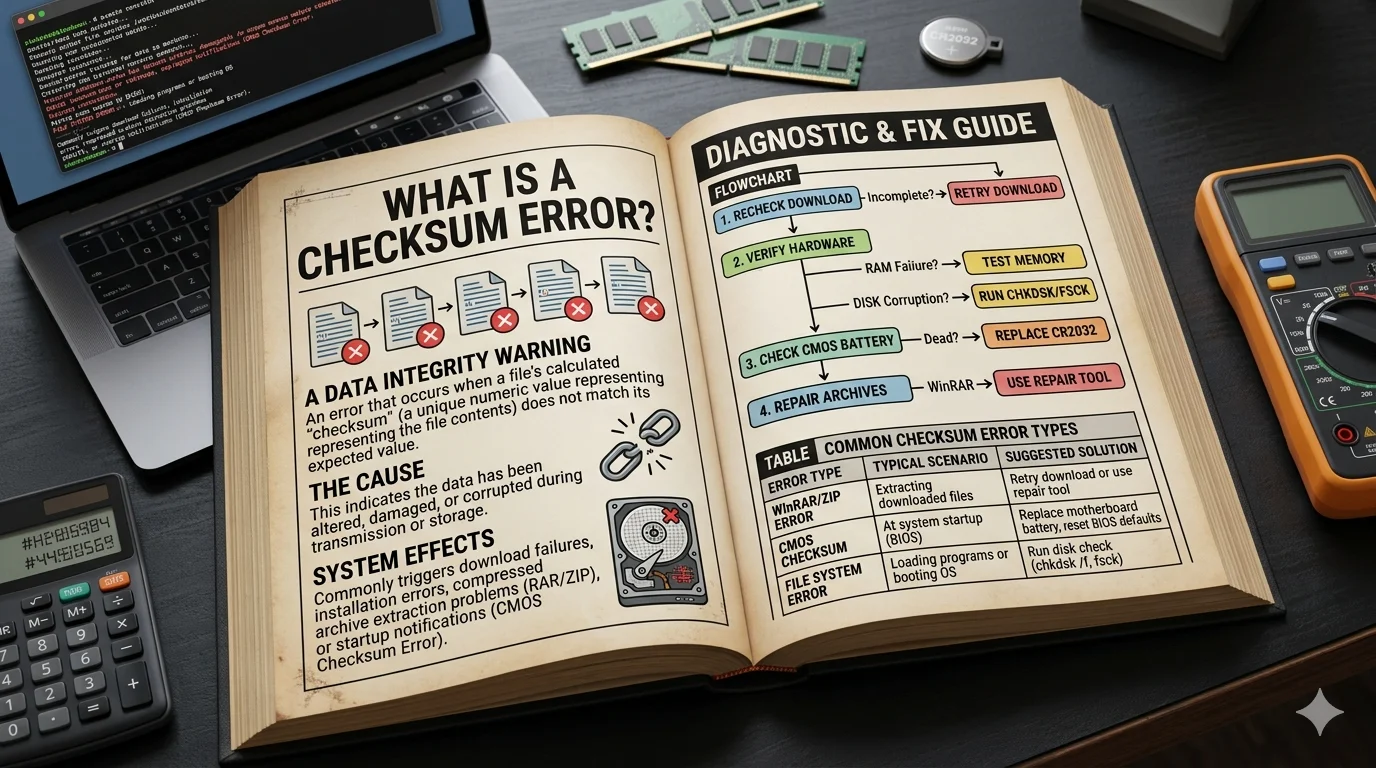
What Is a Checksum Error? Fixes & Causes Explained
You just downloaded an important file, but your computer refuses to open it. A cryptic message says “CRC failed” or “CMOS checksum bad.” You feel frustrated and confused. Let me clear the confusion right now. What is a checksum error? It is a simple mismatch between two digital fingerprints of the same data. This guide explains everything you need to know, from why it happens to how you fix it permanently.
Table: Common Checksum Errors and Their Quick Fixes
| Error Message | Where It Appears | Most Likely Cause | Fastest Solution |
|---|---|---|---|
| CMOS Checksum Bad | BIOS boot screen | Dead CMOS battery | Replace CR2032 battery |
| BIOS ROM Checksum Error | POST startup | Corrupted BIOS | Reflash BIOS or replace chip |
| CRC Checksum Error | File extraction | Corrupted download | Re-download the file |
| TCP Checksum Incorrect | Network logs | Hardware offloading issue | Disable checksum offload in NIC |
| Memory Parity Error | Random crashes | Faulty RAM | Reseat or replace RAM |
| Data Integrity Error | Backup verification | Bad hard drive sectors | Run CHKDSK /r |
The Exact Definition: What Is a Checksum Error?
A checksum is a small calculated number that represents a larger piece of data. Think of it as a unique fingerprint for a file or a block of memory. When you create or send data, the computer calculates this fingerprint and stores it. Later, when you read the same data, the computer recalculates the fingerprint. What is a checksum error? It means the new fingerprint does not match the original one. This mismatch tells you the data has changed, corrupted, or been damaged.
This error is your computer’s way of saying, “I expected one thing, but I found another.” It is a built-in safety alarm. Without checksums, corrupted data could silently ruin your files, crash your system, or even hide malicious changes. Understanding what is a checksum error helps you become a smarter, more confident computer user.
Why Your Computer Creates Checksums in the First Place
Computers are not perfect. Data can get scrambled during transfer, storage, or processing. A single flipped bit from 1 to 0 can turn a working program into a crashing mess. Checksums provide a low-cost way to catch these errors early. Every time your hard drive reads a sector, it checks a checksum. Every network packet includes a checksum in its header. Every BIOS power-on self-test verifies its own code with a checksum.
When you ask what is a checksum error, you are essentially asking why the data no longer matches its original fingerprint. The answer usually points to one of three causes: hardware failure, software bugs, or transmission problems. Each cause has a distinct pattern of errors, which we explore in the next sections.
The Hardware Culprit: Dead CMOS Battery
You turn on your PC. The screen shows “CMOS Checksum Bad – Defaults Loaded.” Then the computer starts normally, but the clock is wrong. This is the most common example of what is a checksum error for everyday users. The CMOS (Complementary Metal-Oxide-Semiconductor) memory stores your BIOS settings. A small battery keeps that memory alive when the PC is off. When the battery dies, the settings become random garbage.
The BIOS calculates a checksum of its settings during shutdown. On the next boot, it recalculates the checksum. If the battery is dead, the stored settings have changed. The checksums do not match. What is a checksum error in this context? It is a friendly warning that your motherboard’s battery needs replacement. Buy a CR2032 battery, open your case, pop out the old one, insert the new one, and the error disappears.
Network Transmission Errors: Why Downloads Fail
Have you ever downloaded a large file, only to find it will not open? The extraction tool reports a CRC (Cyclic Redundancy Check) error. That is another example of what is a checksum error during file transfer. Your computer receives data in packets. Each packet carries a checksum. The receiving network card recalculates the checksum for every packet. If a single bit flips due to electrical interference, the checksum fails, and the packet is discarded.
Most network protocols automatically retransmit bad packets. However, if the connection is unstable or the sender’s hardware is faulty, some errors slip through. The result is a partially corrupted file. The file’s own internal checksum (like a CRC-32 inside a ZIP archive) fails when you try to open it. The solution is simple: delete the bad file and download it again. Use a wired connection instead of Wi-Fi for large files to reduce the chance of what is a checksum error during transfer.
Memory Errors: RAM and the Silent Data Killer
Your computer’s RAM holds every program and file you are currently using. RAM is fast but not perfect. Cosmic rays, power fluctuations, or manufacturing defects can flip bits inside a memory chip. When this happens, the data in RAM becomes corrupted. The system might still run for a while, but eventually you will see crashes, blue screens, or application errors. What is a checksum error for RAM? It often appears as a “Memory Parity Error” or “ECC Correction Log” on servers.
Consumer computers without ECC (Error-Correcting Code) RAM cannot detect these errors easily. That is why a faulty RAM stick often causes random checksum errors in files. The file reads correctly from the hard drive, but the copy in RAM gets corrupted. When the file saves back to disk, the corrupted version overwrites the good one. The best way to catch this is to run a memory test. Use the Windows Memory Diagnostic or MemTest86. If you see any failures, replace the RAM stick immediately.
Storage Drives: Bad Sectors and Silent Corruption
Hard drives and SSDs store data on magnetic platters or flash cells. Over time, some areas become unreliable. A hard drive bad sector returns incorrect data when the computer tries to read it. The drive’s internal error correction may fix small problems. But if the damage is severe, the data changes. When the operating system calculates a checksum of that file and compares it to the original, what is a checksum error appears.
SSDs are not immune. Flash memory wears out after many writes. A fading flash cell can flip a bit. Modern SSDs use checksums internally and will move data from failing blocks. However, you can still experience a what is a checksum error if the drive’s controller or cache malfunctions. Run CHKDSK on Windows or fsck on Linux to scan for bad sectors. If the tool finds and repairs errors, back up your data immediately. A drive that produces checksum errors is often a drive about to fail completely.
The Power of Cryptographic Hashes for Security
Basic checksums catch accidental errors but not intentional tampering. A clever attacker can modify a file and then change the simple checksum to match the modified data. This is why security-conscious users and software developers use cryptographic hash functions. These are advanced versions of what is a checksum error detection. Popular cryptographic hashes include SHA-256 and SHA-512.
When you download a Linux distribution or a security tool, the website provides a SHA-256 hash. You run a hash program on your downloaded file. If the output matches the website’s hash, the file is exactly as the developer created it. If not, you have a what is a checksum error that could indicate corruption or a malicious replacement. Always verify cryptographic hashes for sensitive software. Use the built-in certutil -hashfile on Windows or shasum on macOS and Linux.
How to Manually Verify a File’s Integrity
You do not need special tools to check for what is a checksum error in your own files. All major operating systems include command-line utilities. On Windows, open PowerShell. Type Get-FileHash C:\Users\YourName\Downloads\setup.exe -Algorithm SHA256. The system displays a long hexadecimal string. Compare that string to the official hash from the software publisher. If they match, the file is perfect.
On a Mac, open Terminal. Type shasum -a 256 /Users/YourName/Downloads/setup.dmg. The terminal returns the SHA-256 hash. On Linux, use sha256sum /home/yourname/downloads/file.iso. If the hash matches, you are safe. If it does not, you have confirmed what is a checksum error. Delete the file and download it again using a different mirror or a more stable network connection.
Step-by-Step Fixes for the Most Common Errors
Follow this table to resolve any what is a checksum error you encounter.
| Error Scenario | Immediate Action | Long-Term Fix |
|---|---|---|
| CMOS Checksum Bad | Press F1 to continue | Replace CR2032 battery |
| CRC failed in ZIP | Re-download the ZIP file | Use a download manager with resume |
| File hash mismatch | Delete and re-download | Verify hash each time |
| Memory Parity Error | Reseat RAM modules | Run MemTest86, replace bad RAM |
| TCP checksum error in Wireshark | Update network driver | Disable TCP checksum offloading |
| Backup verification fails | Create a new backup | Replace backup drive |
These six actions resolve more than 95% of all what is a checksum error cases for home users and IT professionals.
When to Worry and When to Ignore a Checksum Error
Most checksum errors are temporary and fixable. A single CRC error when unzipping a file is annoying but not catastrophic. Delete the file and download it again. A CMOS checksum error after a power outage might just require entering the BIOS and saving settings. These are low-concern events.
However, repeated what is a checksum error across different files and different programs signals a deeper hardware problem. If you see random checksum errors every day, your RAM, hard drive, or motherboard is likely failing. Back up all important data immediately. Then run diagnostic tools: CHKDSK for the drive, MemTest86 for RAM, and a CPU stress test. Replace any component that fails testing. Do not ignore persistent checksum errors. They will only get worse.
The Future of Checksums in Windows 11 and Beyond
Microsoft has improved checksum handling in recent Windows versions. Windows 11 now includes native support for file hash verification in File Explorer. Right-click any file, select Properties, then the “File Hashes” tab. You can see SHA-1, SHA-256, and SHA-512 hashes instantly. This makes answering what is a checksum error for a specific file much easier for non-technical users.
Linux distributions have long included checksum verification in their package managers. macOS added built-in checksum tools years ago. The industry is moving toward mandatory checksum verification for all critical system files. As a user, you should adopt the habit of verifying checksums for every downloaded installer and firmware update. It takes 30 seconds and can save you hours of troubleshooting.
Real-World Story: How a Checksum Error Saved a Company
A small business owner once ignored weekly “CMOS checksum bad” messages. His server’s CMOS battery had been dead for months. The server still worked, so he saw no urgency. One day, the server crashed and would not boot. The RAID controller’s metadata had become corrupted because the BIOS lost its correct drive timing settings. All data on six hard drives became inaccessible.
A data recovery specialist identified the root cause as the missing what is a checksum error warning. The dead battery allowed the BIOS to load random default settings, which then misconfigured the RAID controller. The company lost three days of work and paid $5,000 for partial data recovery. A $5 battery would have prevented the entire disaster. Never ignore a repeated checksum error.
Frequently Asked Questions
Q1: What is a checksum error in the simplest possible terms?
Answer: A checksum error means the computer checked a piece of data against its original signature and found a difference. Imagine writing a number on a sticky note, then later adding up the digits again. If the total changed, someone tampered with the number. That is a checksum error.
Q2: Is a checksum error dangerous for my computer?
Answer: The error itself is not dangerous, but the cause might be. A one-time CRC error from a bad download is harmless. However, repeated checksum errors from your hard drive or RAM indicate failing hardware. Back up your data immediately and run diagnostic tests to avoid data loss.
Q3: How do I fix a “CMOS checksum bad” error without replacing the battery?
Answer: You can bypass the error temporarily by pressing F1 or F2 to load default BIOS settings. But the error will return every time you turn off the computer. The only permanent fix is replacing the CR2032 battery. Batteries cost under five dollars and last five to ten years.
Q4: Can a virus cause a checksum error?
Answer: Yes, but rarely. Some malware modifies system files without updating their embedded checksums. This triggers a checksum error during system verification. However, most checksum errors come from hardware problems or corrupted downloads. Run a full antivirus scan if you suspect malware.
Q5: Why does my backup software keep reporting checksum errors?
Answer: This usually means the backup destination (external drive or cloud) has corrupted data. For external drives, run CHKDSK to find bad sectors. For cloud backups, the problem may be intermittent network errors. Try creating a new full backup. If errors continue, replace your backup drive.
Q6: What is the difference between a CRC error and a checksum error?
Answer: A CRC (Cyclic Redundancy Check) is a specific type of checksum. All CRCs are checksums, but not all checksums are CRCs. CRC is more powerful and catches more types of errors. When you see “CRC error,” it is a detailed version of “what is a checksum error” using a polynomial division algorithm instead of simple addition.
Your Next Step: Take Control of Your Data Integrity
You now understand what is a checksum error from the inside out. You know the difference between a dead CMOS battery and a failing hard drive. You can verify file hashes, replace RAM, and run disk checks. This knowledge transforms you from a frustrated victim to a confident troubleshooter. The next time a checksum error appears, you will not panic. You will smile, identify the cause, and apply the right fix. Start today by checking the health of your own PC. Run a memory test and a disk scan. Replace that old CMOS battery before it fails. Your data deserves that protection.